
Homura
Productivity & Office · v2.3.1
Homura is a local comic, light‑novel and ebook reader for Windows that supports many formats and keeps your reading data on the device.
Open sourceWin 11Win 10

PaperDuet lets you view a PDF and its AI translation side by side, keeping formulas, figures and tables aligned, and organizes your papers in a visual library.
 Win 11
 Win 10
Version 0.8.8 · 64-bit · Installer · official file from github.com
PaperDuet is a free desktop tool for researchers and anyone who reads academic papers. It translates PDFs on your computer without sending them online, and shows the original and translated pages together. The program also provides a visual library to organize and track your reading progress.
PaperDuet displays the original PDF and its translation as mirror images, page by page, preserving layout, formulas, figures and tables. You can drop a PDF onto the window to start translation; headings appear first, giving you an instant outline in your language. The app includes six open‑source translation models that run locally, or you can connect an online API for translation. Your papers are stored in a "Shelf" that records how many papers you have read, total reading time and streaks. A "Space" view arranges your library like a night sky, letting you browse papers visually. The interface lets you label papers, filter by AI fields, and track progress week by week. Recent updates add arXiv link download, better handling of already‑translated papers, and fixes for Windows display issues.
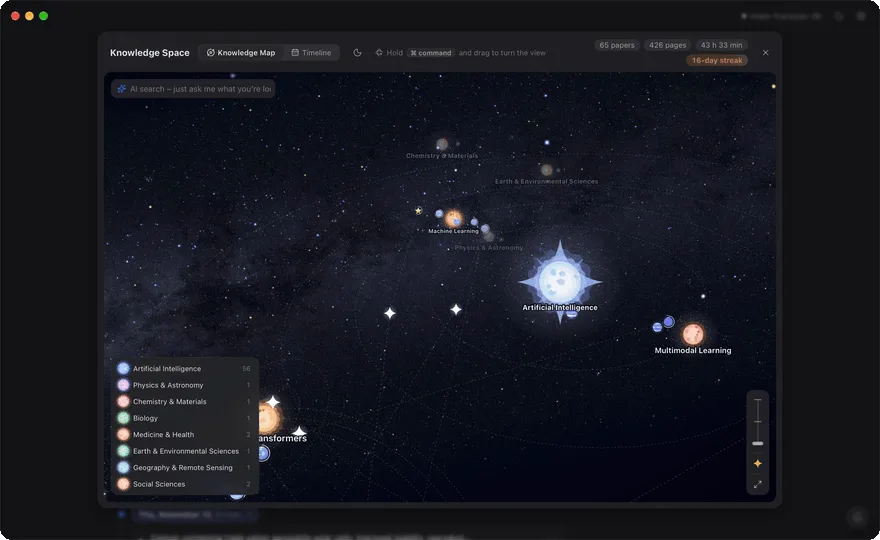
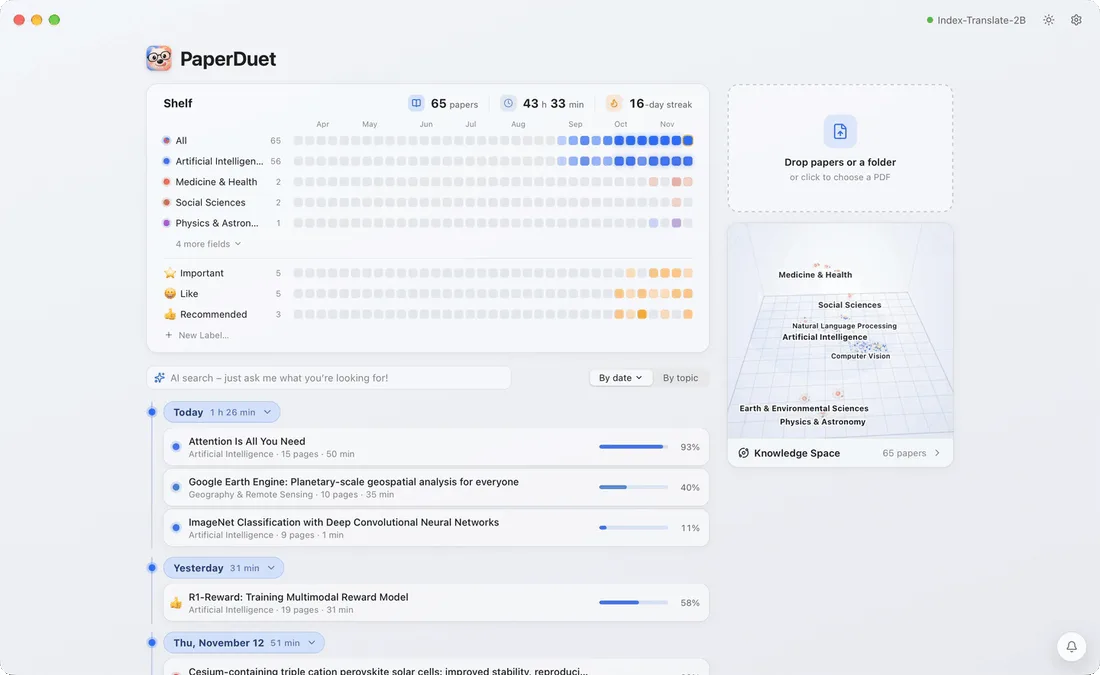
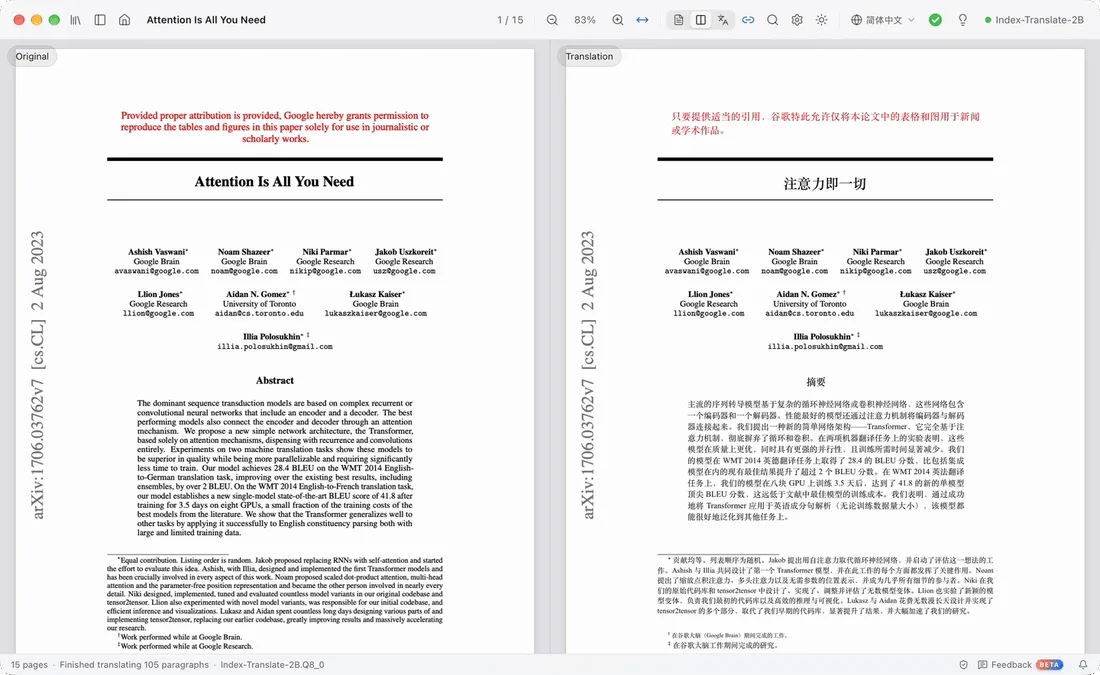
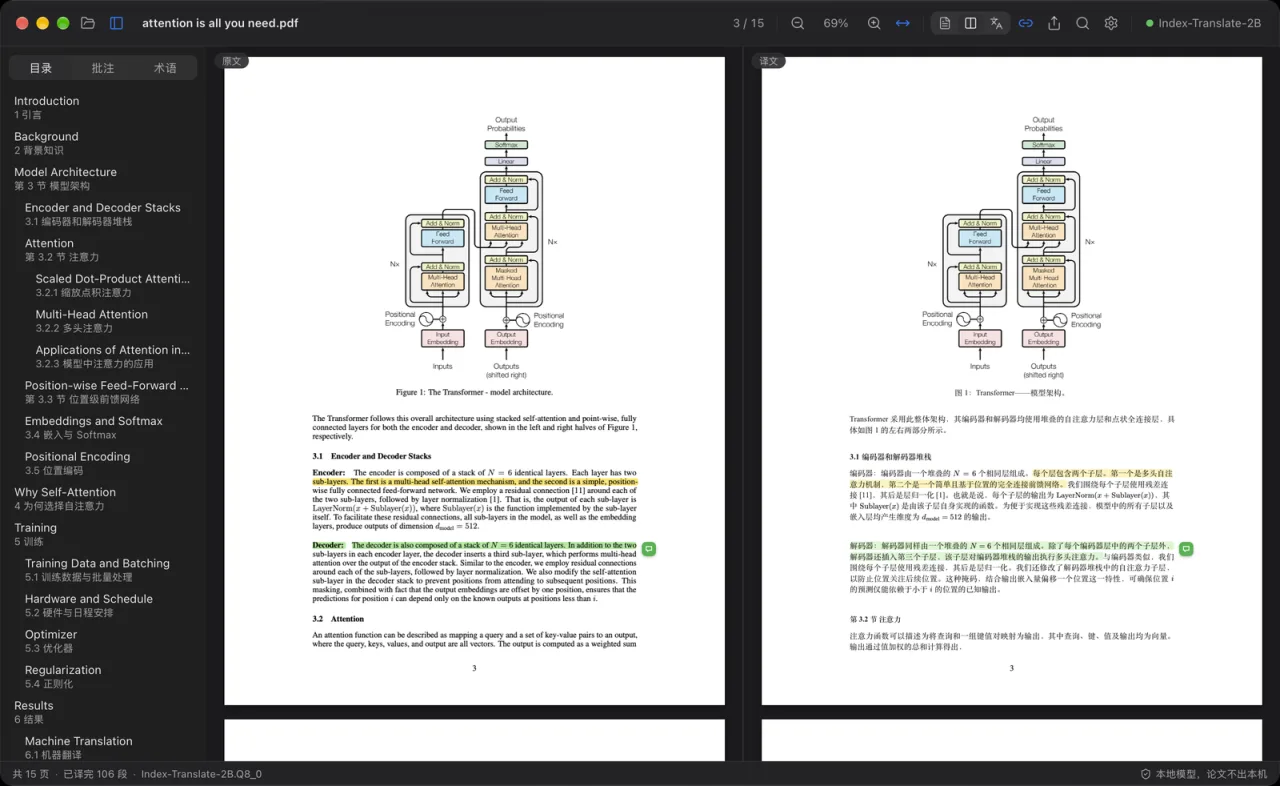
Screenshots from the official PaperDuet project. Click an image to enlarge it.
All files come directly from the official PaperDuet project on github.com. Codehimblog does not host or change them. Most PCs need the 64-bit installer.
| File | Size |
|---|---|
| Installer · 64-bitPaperDuet_0.8.8_x64-setup.exe | 24.1 MB |
Only needed if the latest version does not work for you. Older versions may miss security fixes.
| Version | Released | Windows download |
|---|---|---|
| 0.8.7 | 18 November 2026 | Download (24.0 MB) |
| 0.8.6 | 14 November 2026 | Download (24.0 MB) |
| 0.8.5 | 14 November 2026 | Download (24.0 MB) |
| 0.8.4 | 13 November 2026 | Download (24.0 MB) |
| 0.8.2 | 11 November 2026 | Download (23.9 MB) |
| 0.8.1 | 11 November 2026 | Download (23.9 MB) |
| 0.8.0 | 11 November 2026 | Download (23.9 MB) |
| 0.7.9 | 10 November 2026 | Download (23.4 MB) |
| Windows | Status |
|---|---|
| Windows 11 | Supported |
| Windows 10 | Supported |
 Windows 8.1 | Not supported |
 Windows 8 | Not supported |
 Windows 7 | Not supported |
Yes, the program is free to use.
Translation can run locally without internet, but you can connect an online API if you wish.
Download the latest installer from the official download page and run it.
Use Windows' Add or Remove Programs feature to uninstall.
The software runs locally and does not upload your documents unless you choose an online API.
Free to download and use.
More Productivity & Office software and similar free programs for Windows.
Productivity & Office · v2.3.1
Homura is a local comic, light‑novel and ebook reader for Windows that supports many formats and keeps your reading data on the device.

Productivity & Office · v1.2.5
A lightweight Markdown editor for Windows with live preview, outline navigation, KaTeX and Mermaid support.

Productivity & Office · v0.2.6
A free, open‑source desktop study app that turns your lecture notes, slides, PDFs or exam files into AI‑generated lessons, quizzes, flashcards and mock exams.

Productivity & Office
Local speech‑to‑text and translation tool for Windows that lets you dictate, transcribe audio files and process the resulting text.

Productivity & Office · v0.12.20
Readest is a free, open‑source ebook reader for Windows that handles many ebook formats, lets you annotate, search, and customize the reading view.

Productivity & Office · v0.17.0
Docbank is an open‑source local document vault that stores PDFs, images, text files and other records, makes their text searchable, tracks versions and lets you export verified bundles.

Productivity & Office · v0.20.1
An interactive terminal user interface for DeepSeek Harness that adds a pixel‑whale header, live status panels and shortcut commands to the command line.

Productivity & Office · v3.2.0
A free, open‑source toolbox that adds many utilities for Steam and other game platforms, such as account switching, library management, network acceleration and token handling.

Productivity & Office · v0.38.0
WinShun is a free, open‑source Windows search launcher that lets you find files, content inside documents, apps, settings and clipboard history by pressing Ctrl twice.

Productivity & Office · v2.0.3
A privacy‑first speech‑to‑text program that runs entirely on your computer, supporting 25 languages without sending any data online.
Productivity & Office · v4.4.6
Noobot is a self‑hosted AI agent workspace that lets you run chat‑based workflows, use built‑in tools, and create 3D character animations from plain language prompts.

Productivity & Office · v0.18.1
DeckCraft is an open‑source presentation creator that lets you design, edit and present slide decks with themes, shapes, media and export options.